Disclaimer:
You can see a brief explanation about LaperBang
HERE,
but I will focus on the technical detail on this blog.
Technical Overview
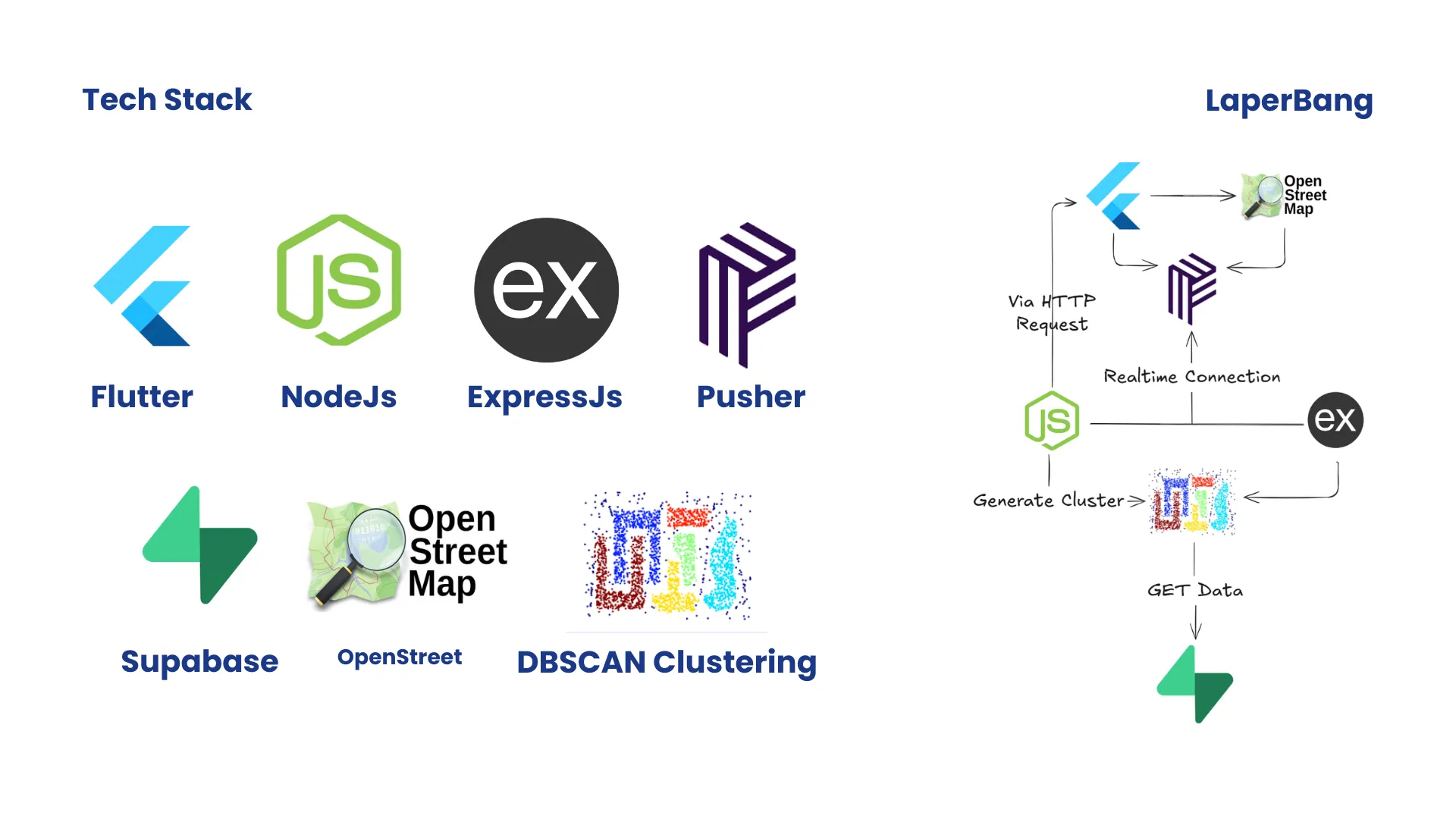
LaperBang is built as a real-time geospatial application that combines location tracking, spatial data processing, and event-driven communication.
The main challenge of this project is not only displaying vendors on a map, but creating a system that can handle dynamic vendor movement, process customer demand based on location, detect potential demand areas, and deliver realtime updates efficiently.
The architecture is divided into several main parts:
Authentication
The user itself consists of 2 roles:
- Customer : The Buyer
- Vendor : The seller
1. Register User
POST /api/v1/auth/register
Body Parameter
| Parameter | Type | Required | Description |
username | string | ✓ | - |
name | string | ✓ | - |
email | string | ✓ | - |
password | string | ✓ | - |
role | string | ✗ | vendor | customer |
2. Login User
POST /api/v1/auth/register
Body Parameter
| Parameter | Type | Required | Description |
email | string | ✓ | - |
password | string | ✓ | - |
3. Get Self Profile
GET /api/v1/auth/me
It will return your detailed information.
Update User Profile
PUT /api/v1/auth/profile
Update user profile based on the currently authenticated user’s role.
4. Body Parameter
| Parameter | Type | Required | Description |
name | string | ✗ | User name that can be updated by all roles. |
email | string | ✗ | User email that can be updated by all roles. |
password | string | ✗ | New user password. |
name | string | ✗ | User name. |
description | string | ✗ | User profile description. |
vendor_status | string/enum | ✗ | Vendor status. Can only be updated by users with the vendor role. Input example: active, moving, idle, close |
vendor_additional_info | object | ✗ | Additional vendor information. Can only be updated by users with the vendor role. |
Field Constraint
Role: customer
Customer can only update:
-
name
-
email
-
password
-
description
The following fields cannot be updated:
-
role
-
vendor_status
-
vendor_additional_info
Role: vendor
Vendor can update:
-
name
-
email
-
password
-
description
-
vendor_status
-
vendor_additional_info
The following field cannot be updated:
Example Request (Customer)
{
  "name": "Alva",
  "email": "alva@example.com",
  "password": "new_password"
}
Vendor Status
PATCH /api/v1/vendors/status
Request Body
{
	"status": "active | Moving | Idle | Close"
}
Vendor availability rule:
| Status | Can be Followed | Can be Called |
|---|
| active | ✓ | ✓ |
| moving | ✓ | ✗ |
| idle | ✓ | ✗ |
| close | ✗ | ✗ |
Clustering Lifecycle
- Forming / request :
- Pre-early stages, not valid yet, called as an request or craving location, pointed with lat and long.
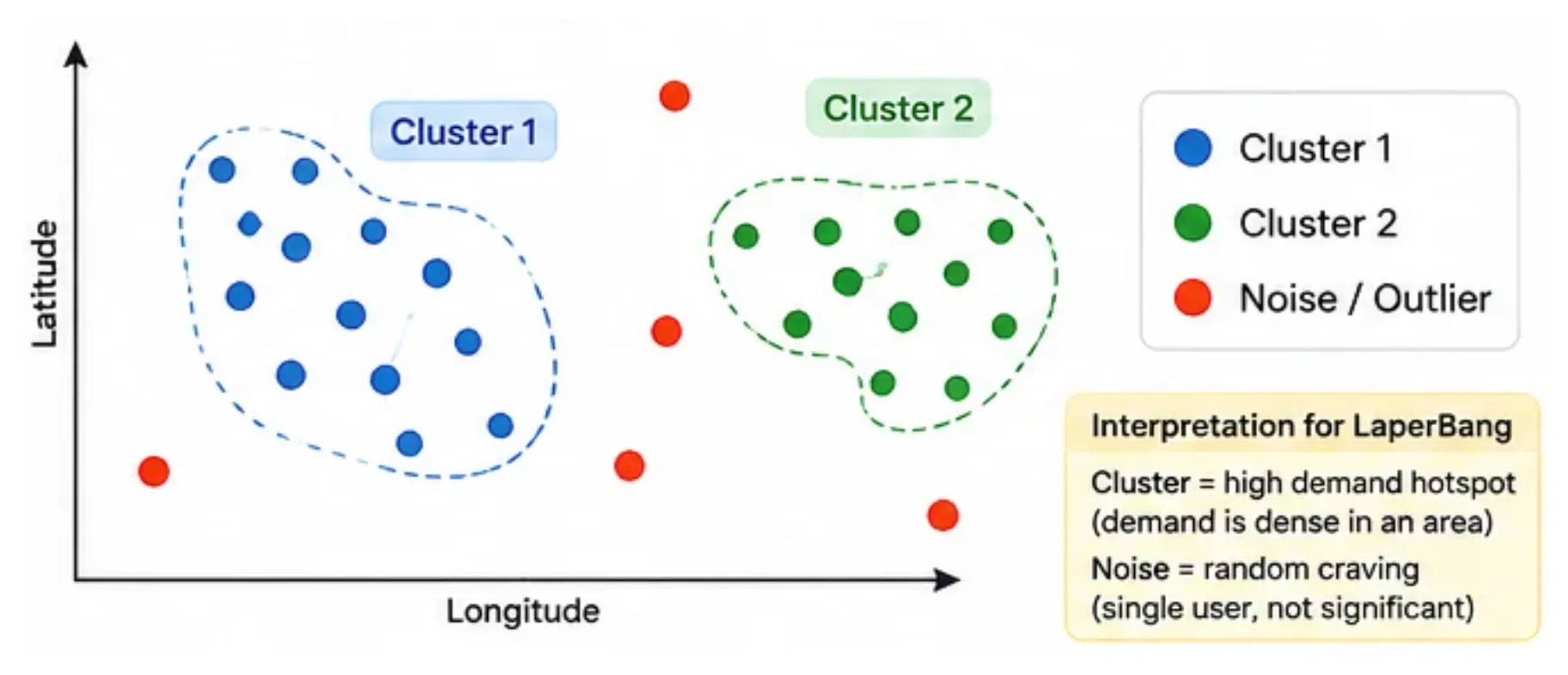
- To make it active / assigned cluster, there must be minimum 2 requests at a certain of time and within 10 meters at maximum.
- Assigned / Active Cluster :
- Server automatically assign an active cluster to the selected vendor.
- But the vendor has to accept or reject it first.
- Accepted :
- Vendor already accept the cluster and now following the cluster centroid.
- Rejected :
Vendor rejected the cluster.
- Fulfilled :
Vendor is in the cluster area (centroid) and mangkal there.
- Expired :
Dead because of time.
- Dissolved :
- Vendor is done with the cluster,
- or forced to be offed because of unexpected things.
Main Flow of LaperBang
So from the customer side, vendor can be followed or called if it accepts the requirements from the Vendor Status that you can see above.
1. See Nearby Vendor
GET /api/v1/vendors/nearby
Example Request
GET /api/v1/vendors/nearby?lat=-6.200000&lng=106.816666&radius=5000
Query Parameters
| Parameter | Type | Required | Description |
lat | number | ✓ | Current latitude postition of customer |
lng | number | ✓ | Current longitude position of customer |
radius | number | ✗ | Maxium search radius range in meter, e.g: 100 |
- User can see nearby vendors on the map
- But they cannot see all existing vendors but only ones within certain radius
- Customer can see the detailed vendor information
- Or Customer can follow or call the selected vendor.
We haven’t decided the maximum radius yet, but we planned to include the radius parameter to minimalize misuse/fake call to a faraway vendors
NB:
- Unfortunately, the customer can only call max. 3 vendors to prevent vendor call spamming.
- This constraint will be reseted if a Request is expired or the Cluster is rejected or fulfilled or expired or dissolved
- For now, the position of nearby vendors on the map are static and updated only based on interval from Frontend via HTTP GET Request, we still have no clue how to make it technically possible for efficient real-time operations.
2. Follow / ikuti Vendor
Follow feature in LaperBang is designed differently from a normal social media follow system.
The purpose of following a vendor is not to create a relationship between users, but to create a realtime tracking subscription between Customer and Vendor.
The Customer first discovers a vendor using a normal HTTP request, then subscribes to the vendor’s realtime channel using Pusher.
- Customer can see the static locatiom of the vendors that exist nearby them.
- If vendor status is ACTIVE or MOVING or IDLE, then the Customer can follow the selected vendor.
- Customer can see vendor real-time location and status in realtime via pusher
Follow Vendor Lifecycle
Example scenario:
- Customer GET
/api/v1/vendors/nearby
- Backend returns nearby vendors
- Customer selects Vendor A
- Customer POST
/api/v1/vendors/:vendor_id/follow
- Backend creates follow relationship
- Customer subscribes to Pusher channel
- Vendor moves / changes status
- Pusher sends realtime update
- Customer map updates automatically
After selecting a vendor, Customer sends: POST /api/v1/vendors/:vendor_id/follow
Example: POST /api/v1/vendors/vendor-uuid/follow
The backend will:
- Validate that the requester is a Customer
- Check the selected user is actually a Vendor
- Check vendor status is not
close
- Create a follow subscription record
Database example:
vendor_follows
{
  "customer_id": "customer-123",
  "vendor_id": "vendor-uuid"
}
This table does not store realtime location.
It only stores:
Customer X wants to receive realtime updates from Vendor Y
Realtime Subscription with Pusher
After successful follow request, frontend subscribes to:
private-vendor.{vendor_id}
Example:
private-vendor.vendor-uuid
The customer listens to:
vendor.location.updated

vendor.status.updated
3. Call / panggil Vendor
POST /api/v1/requests
Request Body
| Parameter | Type | Required | Description |
lat | number | ✓ | Latitude postition of customer when requesting |
lng | number | ✓ | Longitude position of customer when requesting |
vendor_id | number | ✗ | Selected vendor that exists on the map |
- Customer can see the static location of the vendors that exist nearby them.
- If vendor status is ACTIVE / mangkal, then the Customer can follow the selected vendor.
- If a customer calls the vendor, it triggers cluster assignment / forming cluster
- The rest of the process can be seen in the clustering process.
But what if the there are no other requests within 10m meters beside a current request?
We decided to make it still exists as a standalone request and vendor can see the static request position coordinate just to inform they are being called.
NB:
- The reason why “moving” status cannot be called because in this MVP stage, because we don’t have separate statuses for moving with no direction vs moving to an active vendor.
- I make a 10s debounce before requests form into a new cluster.
Where and How is the DBSCAN Clustering process is happening?
The DBSCAN Clustering itself is happening when:
- Customer decides to call a vendor
- There are more than 2 customers within 10m radius
How it works?
- It works like k-means clustering,
- BUT k-means clustering works with choosing: how manyclusters to exist, instead, DBSCAN works choosing the minimum of hotspots and maximum distance between hotspots.
- Take this as an example: Epsilon = 0.001 and requests = 2. it means there must be 2 requests within 10 meters range.
Accepting and Rejecting Cluster
Vendor with assigned cluster can accept and reject a cluster.
Accept:
POST /api/v1/clusters/:cluster_id/accept
Reject:
POST /api/v1/clusters/:cluster_id/reject
Example request:
POST /api/v1/clusters/cluster-uuid-123/reject
Updating Vendor Location
Location sharing feature requires GPS and it costs two things: Battery and Mobile Data.
To make it efficient and doesn’t cost that much resourc
So I propose 2 types of updating location mechanism in this app:
1. Manual / Non-realtime update via HTTP PATCH Request
PATCH /api/v1/vendors/location/static
Only use this request to update the vendor location rarely, e.g. vendor on static location like mangkal or idle, updating vendor location on map, etc
| Parameter | Type | Required | Description |
lat | number | ✓ | Latitude (-90 to 90) |
lng | number | ✓ | Longitude (-90 to 90) |
2. Realtime update via Pusher
This request is realtime and updated via Pusher when the vendor is
moving or wants to update their location in realtime. Yes I know it
costs more resource, but that’s the trade off.
Lets for an example in this route:
PUT /api/v1/vendors/location
| Parameter | Type | Required | Description |
lat | number | ✓ | Current vendor latitude |
lng | number | ✓ | Current vendor longitude |
The main idea:
- Vendor sends their latest GPS coordinate to backend.
- Backend stores the latest location into
live_locations.
- Backend broadcasts the location update through Pusher.
- Every Customer who follows that Vendor receives the update.
- Customer map updates the Vendor marker instantly.
The lifecycle:
- Vendor sends location update:
PUT /api/v1/vendors/location
- Express Backend receives the request.
- Backend updates:
live_locations
- Backend triggers Pusher event:
Channel: private-vendor.{vendor_id}
- Customer subscribes to the same channel:
private-vendor.{vendor_id}
Vendor location update process:
1. Validate GPS coordinate
Backend checks:
- Latitude exists.
- Longitude exists.
- Value must be a number.
2. Prevent unnecessary updates
GPS updates can happen very frequently.
Example:
- 10:00:01
- 10:00:02
- 10:00:03
Sending every update is inefficient.
Because of that, backend uses a throttle mechanism.
Example rule:
- Minimum update interval: 3 seconds.
- If update arrives before 3 seconds:
- Skip database update.
- Skip Pusher broadcast.
3. Store latest location
The backend updates: live_locations
Purpose:
- The table does not store location history.
- It only stores the latest known location of a vendor.
4. Broadcast through Pusher
After database update succeeds:
Channel: private-vendor.{vendor_id}
Event: vendor.location.updated
Example payload:
{
  "vendor_id": "vendor-uuid-123",
  "lat": -6.200000,
  "lng": 106.816666
}
Conclusion
Building LaperBang was not only about creating a map-based application, but about designing a system that can handle real-world dynamic interactions between customers and vendors.
The main challenge was combining multiple technologies such as geospatial processing, realtime communication, and event-driven architecture into one system. By using spatial clustering with DBSCAN, LaperBang can detect potential demand areas based on customer requests and connect them with suitable vendors. Meanwhile, realtime communication through Pusher allows customers to track vendor movement and receive updates efficiently without constantly polling the server.
There are still several areas that can be improved, especially around realtime location optimization, scalability, and handling larger amounts of concurrent users. However, this project provided valuable experience in designing backend architecture for location-based systems, from API design, database structure, clustering algorithms, to realtime event management.
Through LaperBang, I learned that building a scalable application is not only about making features work, but also about understanding trade-offs between performance, cost, complexity, and user experience.
![[object Object]](/_astro/thumbnail.B2cK2Lcr.jpg)
![[object Object]](https://media.licdn.com/dms/image/v2/D4D22AQGxKoVMjrRBAw/feedshare-shrink_800/B4DZzoZnz_GYAc-/0/1773425557035?e=2147483647&v=beta&t=N2PV3p-iy-a7nmatAq9_gqzGAo6DGoFWSsyqrpQrQm0)
![[object Object]](/_astro/thumbnail.UZ4FWwA0.png)